How to Turn a Photo Into an AI Video
Turn any photo into a living AI video: pick source images that animate well, prompt motion that belongs to the scene, and keep identity perfectly stable.
Image-to-video is the highest-leverage feature in AI video: one good photograph in, a few seconds of believable life out. It is also where most attempts fail, because people ask for motion the scene cannot support. A portrait does not need the camera to orbit — it needs an ear to twitch and the background bokeh to breathe. This guide covers choosing a source photo that animates cleanly, writing motion prompts that belong to the scene, and keeping the subject recognizably the same.
The example below animates a single personal-style photo into a four-second clip. The same pipeline works for portraits, pets, product shots, and landscapes in ManifoldGen.
Start with a photo built for motion
The model can only move what it can segment, so source quality decides more than your prompt does:
- Sharp subject — eyes, fur, or edges in crisp focus. Motion amplifies softness into mush.
- Clean background separation — subject clearly distinct from backdrop. Busy scenes force the model to guess where the dog ends and the park begins.
- Single subject — one person or animal per frame. Two subjects trade identity mid-clip; groups are a different technique.
- Some motion already implied — wind-blown hair, string lights, water. The model extends existing energy far better than it invents new energy.
- Decent resolution — roughly 1024px on the long edge. Upscale first if not; animation cannot recover detail the source never had.
Prompt motion that belongs to the scene
INPUT
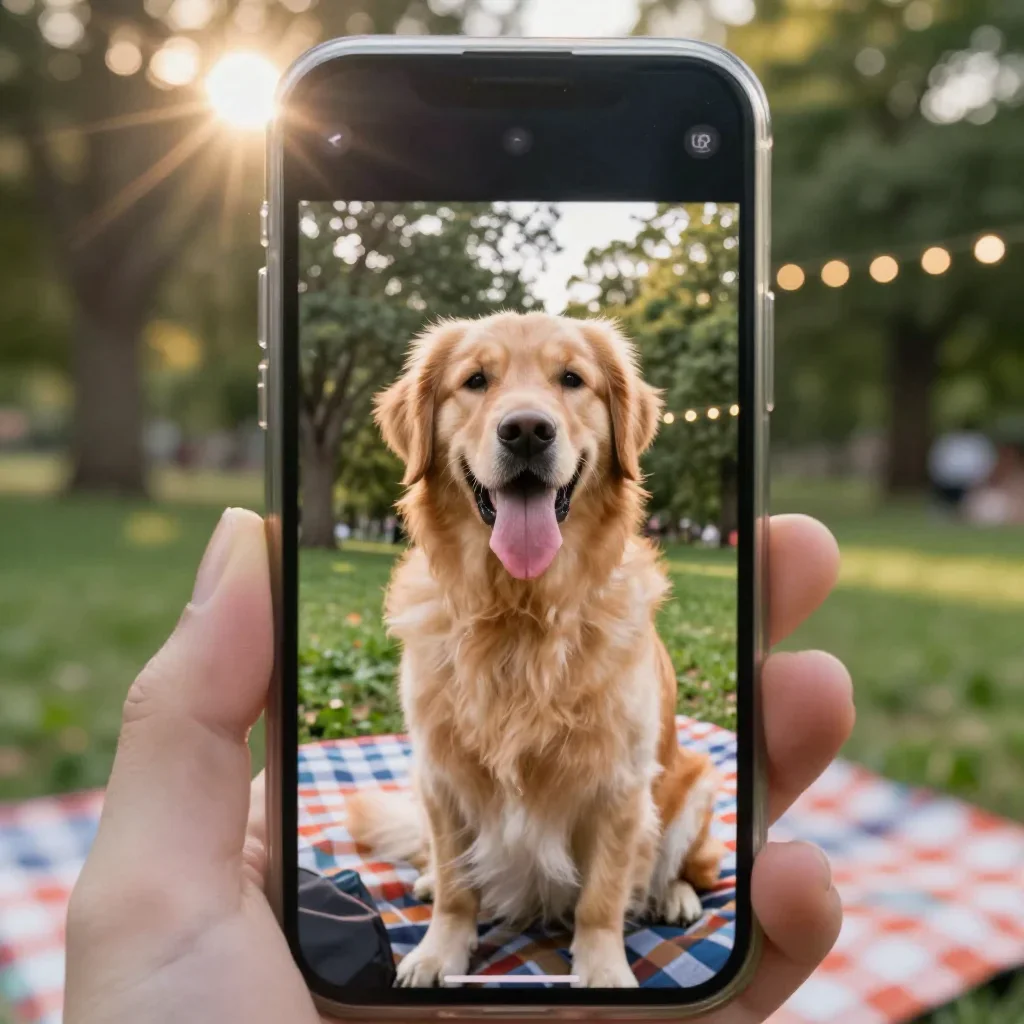
PROMPT
Gentle breeze moves the fur and the grass around the blanket, ears lift as the dog tilts its head slightly toward camera, string lights twinkle softly, background bokeh breathes, natural handheld micro-movement, subtle and lifelike.OUTPUT — GENERATED WITH MANIFOLDGEN
· 4s
The source still was itself generated with this image prompt: "Candid smartphone photo of a golden retriever sitting on a picnic blanket in a park, tongue out, trees and bokeh string lights behind, late afternoon sun flare, slightly imperfect framing like a personal photo." Notice every motion clause names something already present in the frame — fur, grass, ears, lights, bokeh. Nothing asks the scene to gain a new element.
Read that prompt as a checklist of ambient layers: environmental (breeze on fur and grass), expressive (head tilt toward camera), atmospheric (twinkling lights), optical (breathing bokeh), and camera (handheld micro-movement). One clause per layer, each tied to a visible element. That structure is why the result reads as a living moment instead of a morph.
Keep identity stable
Identity drift — faces reshaping, markings migrating — is the failure mode people notice first. Three defenses:
- Keep motion subtle by default. Every unit of movement is a chance to redraw the subject; "slightly", "gently", and "subtle" are load-bearing words, not filler.
- Never ask for pose changes beyond small ones. Head tilts, blinks, breaths, weight shifts work. Standing up, turning around, walking off do not.
- Use low strength when available. Lower image strength pins the output closer to the source pixels at the cost of less motion — the right trade for faces and pets.
If the first generation drifts anyway, halve the number of motion clauses before touching anything else. Overloaded prompts make the model improvise.
A reusable image-to-video skeleton
[Environmental motion] moves [ambient elements],
[small expressive action] as [subject] [micro-gesture toward camera],
[atmospheric layer] softly, background [optical layer] breathes,
natural handheld micro-movement, subtle and lifelike.The single rule behind every good image-to-video clip: extend motion that exists in the frame, never introduce motion that would require a new object, limb, or light source. Wind, blink, breathe, twinkle, ripple — then stop.
Troubleshooting
- Subject melts or changes species — too much requested motion. Cut to two clauses and add "subtle".
- Clip looks like a static zoom — you described the camera but not the scene. Replace camera language with breeze, blink, and light clauses.
- New objects appear (extra dogs, floating leaves) — your prompt introduced elements absent from the photo. Describe only visible things.
- Motion starts strong then freezes — clip length exceeds the prompt's energy. Keep to 4 seconds or add one sustained ambient clause like "wind continues steadily".
- Background warps badly — raise image strength / lower motion strength so the environment stays pinned while the subject moves.
- Face loses likeness across retries — regenerate from the original file each time, not from a previously animated frame.
Pick three photos from your camera roll, run them through the skeleton above in Studio, and keep whichever clip earns a rewatch — then try the same source through different presets under /tools/cinematic-cameras to compare motion styles.
Try these prompts on your own shot.
Every example on this page was generated with ManifoldGen. Open the Studio and run the same structure on your idea.