How to Make Documentary Videos With AI in 2026
Build documentary-style videos with AI the way editors actually work: stills first, Ken Burns motion second, archival looks, narration-first structure, honest labeling.
Documentary is the one genre where AI video fails if you start with video. Long clips drift, faces mutate, and period detail dissolves after a few seconds. The workflow that holds up inverts the order: generate archival-quality stills, lock the look on those frames, then add restrained motion on top. You get the Ken Burns grammar audiences already accept from real documentaries, plus full control over every composition before anything moves.
This guide walks the full pipeline — narration script, still generation, animation, and ethical labeling — using a real example: a 1930s shipyard sequence built from one generated press photograph. Everything runs in ManifoldGen; the prompts are copyable.
The stills-first workflow
- Write the narration first. Documentary structure lives in the script: claim, evidence, scene. Cut the narration into beats of one or two sentences before generating anything.
- Cast each beat as a still. For every narration beat, write an image prompt in period-correct photographic language: era, subjects, setting, film stock. One beat, one frame.
- Generate and grade the stills until the visual world is consistent — same grain, same toning, same lens feel across every frame. Fix problems here, where regeneration costs seconds.
- Animate selectively. Only some stills deserve motion. Push-ins on faces, parallax on wide establishing shots, hold everything else as a true still.
- Label synthetic material. On-screen caption or end card stating AI-generated imagery. Non-negotiable for anything presented as history.
Generate the archive still, then animate it
INPUT
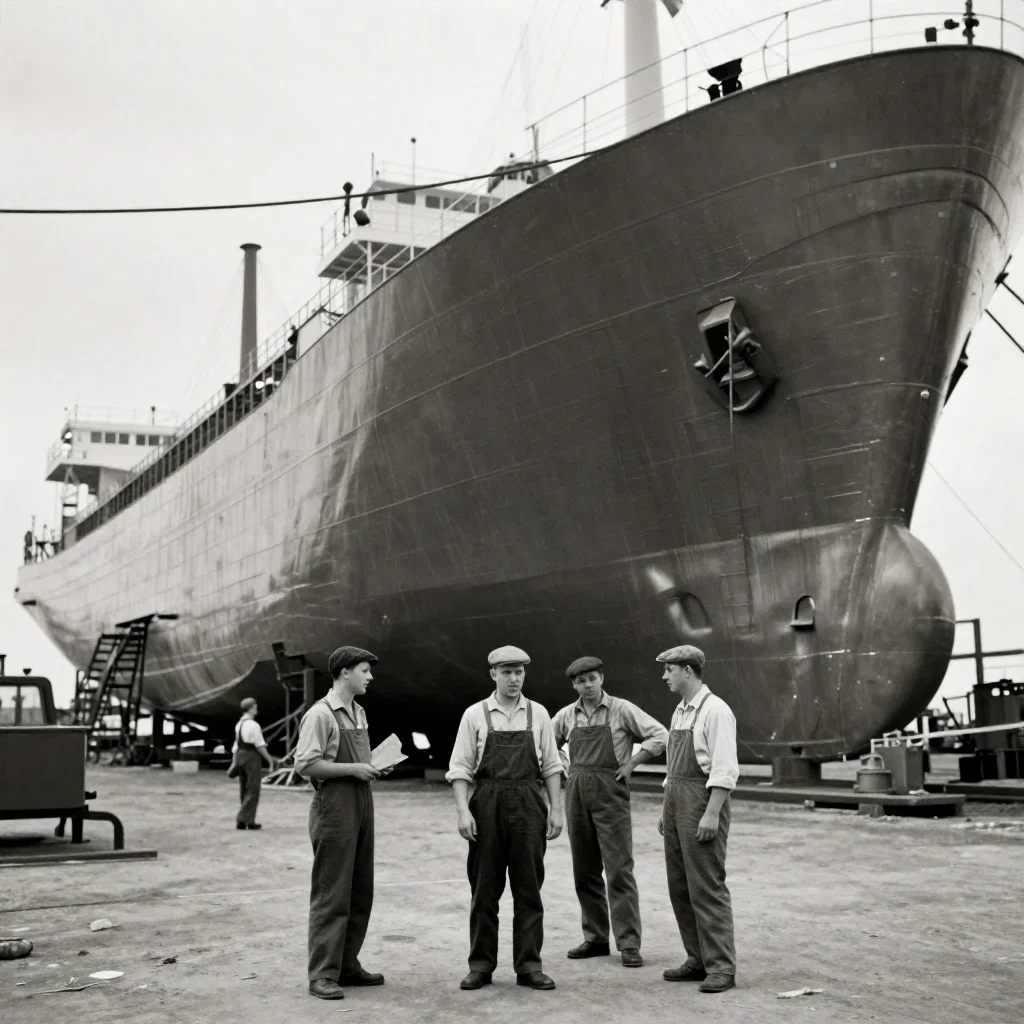
PROMPT
Slow Ken Burns push-in toward the workers' faces, faint film grain flicker and gate weave, subtle parallax between scaffolding and hull, archival documentary treatment, black-and-white with slight sepia toning.OUTPUT — GENERATED WITH MANIFOLDGEN
· 5s
The source still was generated with this image prompt: "Archival black-and-white photograph from the 1930s: shipyard workers in flat caps and overalls standing before an enormous half-built steel hull, scaffolding, overcast sky, film grain, slight sepia toning, documentary press photo." Because the motion prompt re-states the archival treatment (grain flicker, gate weave, sepia), the animated frames stay graded identically to the still instead of snapping to clean digital video.
Two details make this read as archival rather than AI. First, "gate weave" — the tiny jitter of physical film in a projector — masks the micro-warping that gives synthetic video away. Second, the parallax clause adds depth without inventing geometry: scaffolding slides slightly against the hull while faces stay fixed.
The archival look is a grade, not a filter word
"Vintage" alone returns modern footage with an orange tint. Period realism comes from stacking specific photographic facts that captions use:
- Stock and process — "black-and-white with slight sepia toning" for pre-war, "Ektachrome, faded colors, dust and scratches" for mid-century color, "16mm, visible grain" for 1960s–70s reportage.
- Optics — "slightly soft focus", "vignetting at corners", "shallow vintage lens". Sharpness is the biggest tell of synthetic imagery.
- Damage vocabulary — "film grain", "dust specks", "gate weave", "light leak at frame edge". Pick two or three, not all of them.
- Composition conventions — press photos are eye-level, frontal, slightly imperfect framing. Ask for "documentary press photo" and let composition go candid.
Apply the same grade words to both the still prompt and the motion prompt. The model animates toward its training distribution; restating the grade anchors the output there.
Narration-first structure
Edit picture to the voiceover, never the reverse. A workable rhythm for a short piece: cold open on your strongest animated still (5 seconds), narration begins over a held photograph (8 seconds), push-in or parallax under the key claim, cut back to stills for supporting detail, end card with sources and the AI disclosure. Most beats should sit on static frames with only grain movement — motion loses authority when every shot moves.
A reusable archival animation skeleton
[Camera move] toward [subject detail], faint film grain flicker
and gate weave, subtle parallax between [near element] and [far element],
archival documentary treatment, [stock/process words] with [toning].In documentary, animation exists to direct attention — toward a face, into a crowd, along a street. If a move does not point the viewer somewhere the narration names, leave the frame still. Restraint is what separates documentary from slideshow.
Fixing common failures
- Animated frames lose the film grade — the motion prompt omitted the treatment. Repeat the stock, toning, and damage words verbatim in the video prompt.
- Faces morph during push-in — the move is too fast or too long. Slow it, target a feature ("toward the workers' faces"), keep clips under 6 seconds.
- Parallax tears the scene apart — near and far elements are not clearly separated. Name two concrete layers, like scaffolding versus hull.
- Stills across scenes look inconsistent — regenerate from your best frame as the style anchor and reuse the identical grade phrase everywhere.
- Viewers assume it is real footage — your labeling is insufficient. Put the disclosure on screen during the footage, not only in the description.
Draft your script, cast its beats as stills, and test the strongest two as animated shots in Studio before committing to a full edit — the /tools/cinematic-cameras presets cover most of the push-in and parallax moves you will need.
Try these prompts on your own shot.
Every example on this page was generated with ManifoldGen. Open the Studio and run the same structure on your idea.