How to Keep Characters and Locations Consistent Across AI Shots
Consistency across AI shots is a memory problem: build one character sheet, pass it as reference on every shot, repeat descriptors verbatim, fix the rest in edit.
Every narrative AI video hits the same wall: shot one gives you a perfect character, and by shot four she has a different face, jacket, and hairline. Video models have no memory between generations. Consistency is not something you ask for — it is a system you build around the model: one reference image, one frozen descriptor block, and an edit pass that absorbs the last twenty percent.
This guide builds that system. The running example is a field botanist who appears in two locations — a bioluminescent moss cave and a jungle trail — generated from the same character sheet. You need an image model for the reference sheet and a video tool that accepts image references, such as /studio.
The reference sheet is your memory
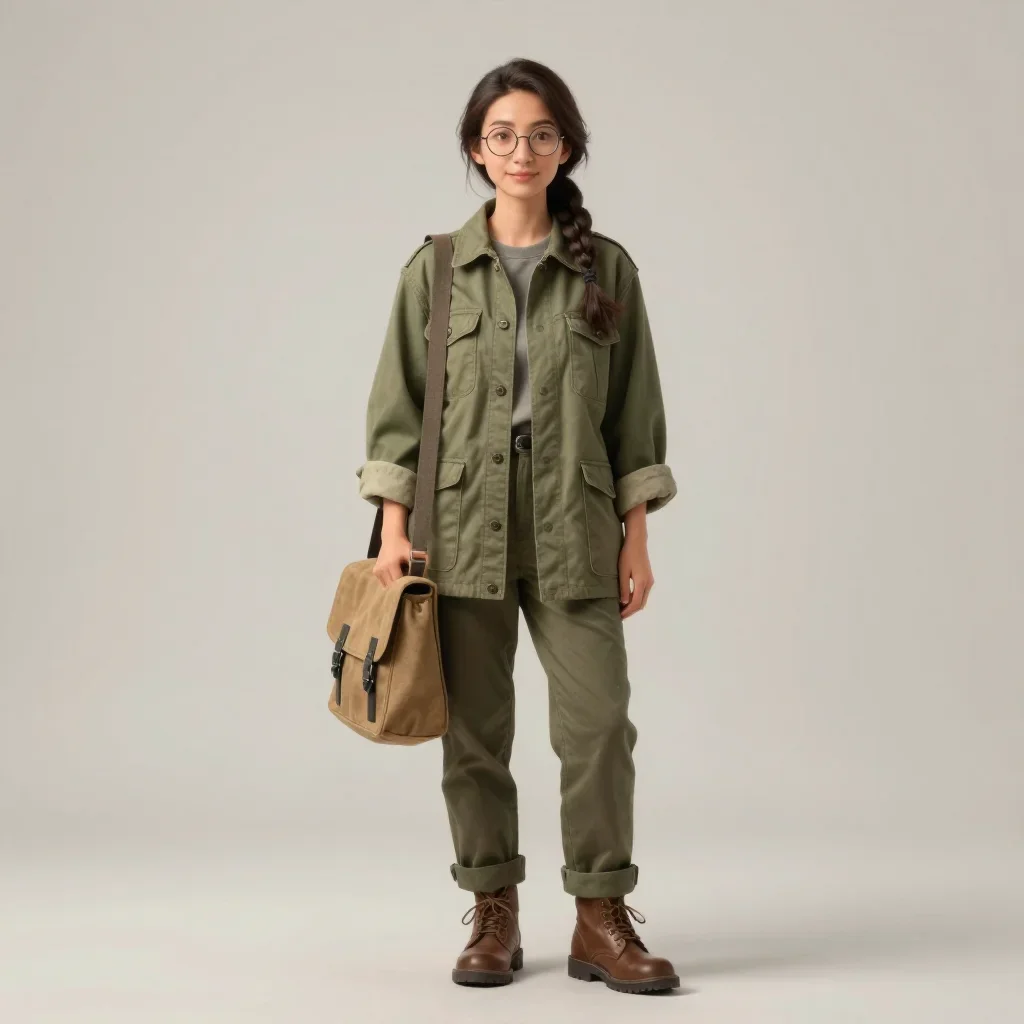
Before generating any footage, design the character once as a full-body still. This single image is passed as reference on every subsequent shot, which anchors identity far better than any prompt adjective. Write the sheet prompt like a casting call: wardrobe, hair, accessories, pose, background.
Full-body character design of a woman in her thirties,
a field botanist: olive field jacket with rolled sleeves,
round glasses, dark hair in a single braid, canvas satchel,
standing relaxed pose facing camera, neutral light-grey
studio background, soft even lighting, consistent character
reference sheet look.
Three rules for the sheet itself. Neutral grey studio background so no environment bleeds into the reference. Flat even lighting so the video model reads shape, not mood. Relaxed standing pose facing camera, because extreme poses contaminate every downstream generation. Generate two or three candidates and pick one before moving on; never swap sheets mid-project.
One reference, two locations
INPUT
PROMPT
The botanist kneels in a bioluminescent moss cave at night, lifting a glowing fern leaf toward her lantern, awe on her face, medium shot, cool teal glow against warm lantern light, gentle handheld drift.OUTPUT — GENERATED WITH MANIFOLDGEN
Shot 1 — moss cave · 4s
Shot 2 — jungle trail · 4s
Both shots attach the same character sheet as image reference while the prompts change only location, action, and light. Shot 2 prompt: "The botanist pushes through a sunlit jungle trail, parting leaves with one hand, tracking shot from the front at walking pace, dappled green light, documentary realism, same character as reference." Identity holds because it comes from the image, not the text.
Notice what changed between shots and what did not. Location, action, camera move, and lighting are all new per shot. Wardrobe, glasses, braid, and satchel appear nowhere in either shot prompt — they ride in on the reference image. That division of labor is the whole technique: the image owns identity, the prompt owns staging.
Repeat descriptors verbatim
The reference does most of the work, but text still leaks in. When a character must be described in prose — close-ups where the sheet crops poorly, or models without reference support — copy the exact phrase block every time:
- Build one canonical descriptor string per character ("woman in her thirties, olive field jacket with rolled sleeves, round glasses, dark hair in a single braid, canvas satchel") and paste it unedited into every prompt that names her.
- Never paraphrase. "Dark braided hair" and "single braid" produce different people at scale.
- Put the descriptor immediately after the character name or pronoun, before action verbs — position early in the prompt carries more weight.
- Do the same for recurring props: the lantern, the satchel, the fern. Named props get frozen phrases too.
- Store all frozen strings in one notes file per project. When you revise a character, revise the file once and regenerate.
Keep a location bible
Characters get reference images; locations get named details. A location bible is a short list of concrete, repeatable features per set: the moss cave has a narrow entrance shaft, a shallow pool reflecting the glow, and fern clusters on tiered rock shelves. Every shot set there reuses those nouns verbatim, exactly like character descriptors.
Named details beat atmosphere words because they survive prompt compression. "Bioluminescent cave" regenerates differently each time; "shallow pool reflecting blue-green glow beneath tiered rock shelves" reconstructs recognizably the same space. For hero locations, generate one establishing still per angle and use it as image reference the way you use the character sheet — same mechanism, applied to sets.
[Character name], [frozen descriptor block verbatim],
[action], [location with bible details],
[shot size], [camera move], [lighting],
[reference image attached].No pipeline yields identical characters across every frame. Target eighty percent consistency from references plus verbatim descriptors, then spend your effort in the edit: cut away before drift becomes visible, order shots so weaker matches sit between strong ones, and grade all clips toward one color treatment. Chasing perfection per-generation costs more than fixing in post.
When identity drifts anyway
- Face changes but wardrobe holds — reference image was cropped too tight. Regenerate the sheet full-body with clear headroom and hands visible.
- Wardrobe changes mid-scene — the descriptor block was paraphrased or omitted. Restore the verbatim string next to the character name.
- Character looks right but age shifts shot to shot — add the age phrase to the frozen block ("in her thirties") rather than trusting the reference alone.
- Lighting style overpowers identity — extreme color contrast (teal against warm) can wash facial detail. Soften the key or shorten hold times on those shots.
- Location looks different after a cutaway — the bible details were dropped. Re-paste the named-detail list into the returning shot prompt.
- Everything almost works — stop regenerating. Cut earlier, intercut, and grade; the audience reads sequence, not frames.
Build the sheet once, freeze the descriptor strings, log your locations, then generate both test shots side by side in Studio to check the match before producing a full scene. The cinematic camera presets in /tools/cinematic-cameras keep motion language as disciplined as the identity system.
Try these prompts on your own shot.
Every example on this page was generated with ManifoldGen. Open the Studio and run the same structure on your idea.